
For a small medicine shop, a simple pharmacy POS system with inventory tracking may be enough. A busy retail pharmacy might need batch-wise stock management, barcode billing, customer dues and accounting. A pharmacy chain may require centralized inventory, stock transfers, branch-wise sales reports and additional management controls.
MM IT SOFT LTD is one pharmacy software provider worth evaluating in Bangladesh, particularly for businesses looking for customizable pharmacy management software with connected billing, inventory, purchase, supplier and reporting workflows.
But before choosing a provider, it helps to understand what your pharmacy actually needs.
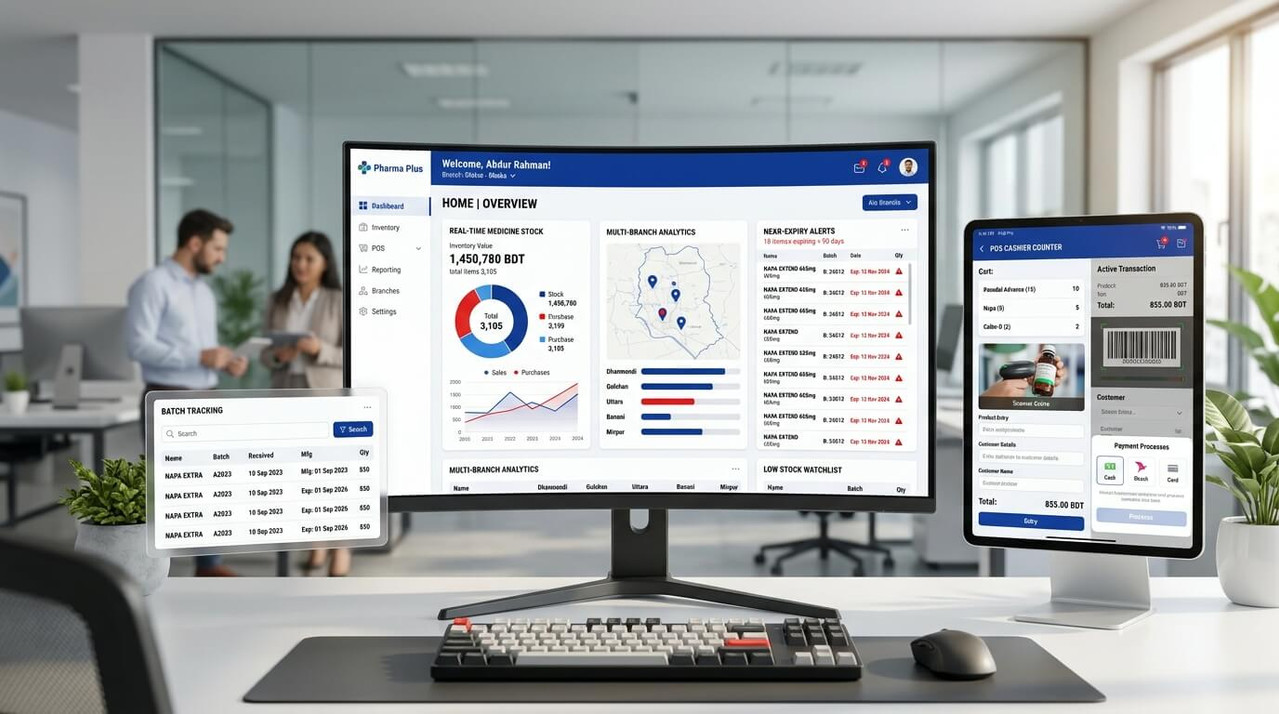
Why Choosing the Right Best Pharmacy Management Software Matters in 2027
It's evening, and customers are waiting at the counter. One customer needs several medicines, but your employee cannot immediately confirm whether the required brand is available.
That's why choosing the right pharmacy business software is an important decision for 2027.
What Is the Best Pharmacy Management Software in Bangladesh?
The best pharmacy management software in Bangladesh is a system that fits the pharmacy's daily workflow, supports accurate medicine inventory and expiry tracking, provides fast billing, and offers reliable implementation and support.
For Bangladeshi medicine shops, the most important features generally include:
MM IT SOFT LTD provides pharmacy management software in Bangladesh designed around these business operations. Its approach is particularly relevant when a pharmacy needs its software to accommodate a specific workflow.
However, no single software provider is automatically the best for every pharmacy. The right choice depends on your budget, business size, required features and expected support.
Pharmacy Management Software Options in Bangladesh for 2027
Pharmacy owners researching the best pharmacy software in Bangladesh will encounter local providers, international software products and general business management systems.
Here are several options worth understanding.
1. MM IT SOFT LTD — Customizable Pharmacy Management Software
MM IT SOFT LTD is a Bangladesh-based custom software development company offering pharmacy management solutions for medicine shops and healthcare-related businesses.
Its pharmacy software focuses on connecting daily pharmacy activities, including sales, medicine inventory, batch and expiry tracking, purchase records, supplier payments, accounting and reporting.
For example, a pharmacy owner can use the system to understand which medicines were sold, what stock remains, which supplier payments are outstanding and which products are approaching expiry.
The system can also be tailored to specific business requirements, making it relevant for pharmacies whose workflows do not fit a basic ready-made POS system.
- Suitable for: Retail pharmacies, medicine shops, growing pharmacy businesses and organizations that need customizable pharmacy operations.
- Key areas: Pharmacy POS, inventory, expiry management, purchase, supplier ledger, accounting and reporting.
Explore the MM IT SOFT LTD Pharmacy Management System to understand its modules and request a demonstration.
2. ASTGD — Pharmacy POS and Inventory Software
ASTGD offers pharmacy management software with medicine stock control, barcode billing, box-wise and piece-wise sales, supplier management, expiry tracking and reporting.
Its publicly available product information includes subscription pricing and online/offline operation.
The system is worth evaluating for pharmacy owners seeking a ready-made solution with clearly described pharmacy-specific functions.
3. InventoryPlus Pharmacy — Inventory and Billing Solution
InventoryPlus Pharmacy is another software product to consider for inventory, billing and accounting requirements.
Pharmacy owners should evaluate whether its available features, deployment options and support arrangements meet the requirements of operating a pharmacy in Bangladesh.
4. ScriptPro — Advanced Pharmacy Technology
ScriptPro focuses on pharmacy technology, including prescription processing and automation.
Its capabilities may be relevant to organizations with specialized dispensing and pharmacy workflow requirements.
However, a small retail medicine shop in Bangladesh should carefully examine implementation complexity, pricing and local suitability before considering advanced international pharmacy platforms.
Which Option Should You Choose?
For a Small Pharmacy
Prioritize easy billing, stock accuracy, expiry management and affordability.
For a Growing Pharmacy
Consider integrated accounting, supplier payments, user permissions and reporting.
For a Pharmacy Chain
Look for centralized inventory, branch-wise reporting, stock transfers and customizable controls.
Rather than selecting a provider purely from a ranking, request a practical demonstration using your own business scenarios.
12 Essential Features of the Best Pharmacy Management Software
A good pharmacy system should do more than generate invoices. It should address the operational problems that create mistakes, delays and unnecessary business costs.
1. Pharmacy Inventory Management Software
Medicine inventory is one of the most important parts of running a pharmacy.
Without accurate stock records, a shop may order products it already has or fail to purchase medicines customers regularly request.
Reliable pharmacy inventory management software should help owners:
- Track available medicine quantities
- Record stock purchases and sales
- Manage stock by category and batch
- Identify low-stock products
- Monitor purchase and sales returns
- Review stock adjustment history
- Generate current inventory reports
For a pharmacy carrying hundreds or thousands of medicine items, these records can make stock management considerably more organized.
2. Medicine Expiry Date and Batch Tracking
Expired medicine is not just a financial problem. It is also a product safety concern.
A modern pharmacy expiry management software system should identify medicines approaching their expiration dates and help staff take appropriate action.
Batch Tracking Scenario: Consider a pharmacy that purchases the same medicine in January and March. The two purchases may have different batch numbers and expiry dates. If staff only check the total quantity, they might overlook the older batch. With batch-wise medicine inventory tracking, the pharmacy can identify which products need attention first.
Useful features include expiry date reports, near-expiry alerts, batch history, expired stock identification and purchase return records. This is one of the most valuable reasons to move away from manual medicine stock management.
3. Pharmacy POS Software and Fast Barcode Billing
Customers should not need to wait while staff manually calculate a bill.
A good pharmacy POS software system makes medicine sales faster and easier to record.
Pharmacy billing software commonly supports medicine searching, barcode scanning, quantity selection, discounts, payment recording and invoice printing.
Fast Counter Sale Scenario: For example, when a customer buys five different medicines, the cashier should be able to select the products, confirm quantities, check the total and complete the sale without complicated manual calculations. The POS system should update stock accurately after the transaction.
For a busy pharmacy in Dhaka, a practical, easy-to-learn billing interface may be more important than a long list of unnecessary features.
4. Box-Wise and Piece-Wise Medicine Management
Pharmacies frequently purchase medicines in boxes or strips but sell them in smaller quantities.
Tablet Unit Logic: Suppose one box contains 100 tablets, and a customer purchases 15 tablets. A pharmacy system needs to deduct the correct quantity and show the remaining stock accurately.
When evaluating medicine shop software, test whether it can manage different purchase and sales units and preserve accurate batch information. This is especially important for retail pharmacies handling both wholesale-style purchases and individual medicine sales.
5. Pharmacy Purchase and Supplier Management
Every pharmacy depends on reliable medicine suppliers.
But keeping supplier invoices, payments, returns and outstanding balances in separate notebooks can cause confusion.
A pharmacy purchase management system should help businesses record purchase invoices, supplier details, payments, outstanding balances and purchase returns.
Supplier due management is particularly useful for pharmacies that purchase medicines on credit. Instead of manually checking every invoice, the owner can review supplier payment records and understand which amounts remain outstanding.
6. Pharmacy Accounting Software
High sales do not always mean high profit.
A pharmacy may sell a large quantity of medicines while also facing significant purchase costs, operating expenses and supplier payments.
That's why pharmacy accounting software should connect financial information with daily business activity.
Useful accounting features include cash receipts, expense tracking, supplier payments, customer dues, sales summaries, profit and loss reports, and financial ledgers.
When choosing software, ask how it calculates profit and whether purchase cost, discounts, returns and operating expenses are reflected correctly.
7. Customer Management and Due Tracking
Some pharmacy businesses maintain customer purchase histories or provide approved credit facilities to regular customers.
In these situations, a customer management system can help record transactions and outstanding balances.
The system may also support customer invoices and payment history.
If prescription or patient information is stored, access should be restricted to authorized users and handled with appropriate privacy safeguards.
8. Sales Returns and Purchase Returns
Medicine returns require careful records.
A customer may return an eligible product, or a supplier may accept medicines according to agreed return conditions.
A pharmacy management system should maintain a clear record of approved returns and related stock or accounting adjustments.
Return handling must follow applicable pharmacy rules, product safety requirements and supplier policies. Returned medicines should not automatically re-enter saleable stock.
9. Multi-Branch Pharmacy Management Software
Running one medicine shop is different from operating five branches.
When a pharmacy business expands, owners need visibility into branch performance and inventory.
A multi-branch pharmacy management software system may provide:
- Branch-wise medicine stock
- Centralized purchase management
- Stock transfers between branches
- Branch-specific sales and expense reports
- Central management dashboards
- Staff access by branch
- Consolidated business reporting
For pharmacy chains, the ability to see inventory and financial information across locations can make expansion easier to manage.
10. Pharmacy Reports and Business Analytics
A pharmacy owner should be able to answer simple questions without spending hours checking records.
- How much did we sell today?
- Which medicines are selling quickly?
- Which items are running low?
- How much do we owe suppliers?
- What is our current stock value?
- What were this month's operating expenses?
A useful pharmacy reporting system makes these answers easier to obtain through daily sales reports, inventory reports, supplier ledgers, expense summaries and profit analysis.
11. Staff Management and User Permissions
Not every employee should have permission to change purchase costs, edit invoices or access financial reports.
Role-based access controls help pharmacy owners assign appropriate permissions to cashiers, stock managers, accountants and administrators.
An activity history is also useful for reviewing important changes and transactions. When comparing software, ask whether these controls are built in or require customization.
12. Data Backup, Security and Support
Pharmacy business records are important assets.
Before buying any system, understand how your information is stored, backed up and recovered.
Ask the software provider about user access security, backup arrangements, data export, technical support and what happens if an internet or server problem interrupts operations.
Cloud pharmacy software, desktop systems and hybrid deployments have different advantages. Choose based on how your business operates, rather than assuming one deployment method is always better.
Pharmacy POS Software vs Complete Pharmacy Management Software
These two terms are often used together, but they do not always describe the same scope.
| Pharmacy POS Software | Complete Pharmacy Management Software |
|---|---|
| Focuses mainly on checkout and sales | Connects sales with wider operations |
| Creates customer invoices | Manages sales, purchase and stock |
| Supports barcode billing | Includes inventory and batch tracking |
| May offer basic stock reports | Can include expiry and supplier management |
| Suitable for basic retail billing | Suitable for broader business control |
A small medicine shop might begin with a pharmacy POS system.
However, if the business regularly experiences inventory mismatches, unpaid supplier invoices or difficulty tracking expiry dates, a more complete pharmacy management system may be appropriate.
How Much Does Pharmacy Management Software Cost in Bangladesh in 2027?
The pharmacy software price in Bangladesh depends on the provider, licensing model, required modules, number of users, branches and customization.
Some vendors offer monthly or annual subscriptions. Others provide one-time licenses or individually quoted software projects.
When comparing pharmacy management software costs, consider the full cost of ownership rather than the advertised starting price alone.
| Cost component | What to ask |
|---|---|
| Software license | One-time payment or subscription? |
| Installation | Is initial setup included? |
| Users | Are there extra user charges? |
| Branches | Does each outlet cost more? |
| Customization | Are workflow changes included? |
| Training | Is staff training provided? |
| Support | What is covered and for how long? |
| Data migration | Can existing medicine records be imported? |
| Hardware | Will scanners and receipt printers work? |
A low-cost system may be sufficient for a small shop. A larger pharmacy chain may benefit from paying more for integration, customization and better operational controls.
For MM IT SOFT LTD pharmacy software pricing, the most reliable approach is to share your requirements and request a quotation based on the modules your business needs.
Pharmacy Operations & Time-Saving Estimator
Estimate the monthly manual administrative hours saved by automating stock, expiry, and supplier dues.
Is Cloud-Based or Desktop Pharmacy Software Better?
Cloud-based pharmacy management software can be attractive for businesses needing access from multiple locations.
Desktop pharmacy software may suit an individual shop that prefers a primarily local setup.
However, the decision should also consider internet reliability, backup arrangements, access security, synchronization and support.
For businesses that experience internet interruptions, ask vendors to demonstrate exactly what happens when connectivity is lost.
Do not assume that every cloud pharmacy system works offline or that every desktop product provides automatic backup.
How to Choose the Best Pharmacy Software for Your Business
Before purchasing pharmacy software in Bangladesh, use this simple evaluation process.
Are you struggling with billing delays, expired medicines, stock mismatches, supplier dues or inaccurate reports?
A small retail pharmacy may only need POS, stock, expiry and purchase modules. A pharmacy chain may need advanced inventory and centralized reporting.
Ask the vendor to perform a complete sale, record a medicine purchase, check an expiry report and show how supplier payments are handled.
Your staff will use the system every day. Complex software that employees struggle to operate may create more problems than it solves.
Understand licensing, training, customization, data backup and ongoing technical assistance before signing an agreement.
Ensure the vendor can customize workflows or scale up branches as your medicine business expands.
Why Consider MM IT SOFT LTD Pharmacy Management Software?
MM IT SOFT LTD is a custom software development company based in Dhanmondi, Dhaka, Bangladesh.
Its pharmacy management solution focuses on the business operations that matter to medicine shop owners: inventory, batch and expiry tracking, billing, purchase, supplier payments, accounting and reporting.
One reason to consider MM IT SOFT LTD is its approach to business-specific software development.
Not every pharmacy operates in exactly the same way. A neighborhood medicine shop may need a straightforward billing and stock system, while a growing retail chain may require additional management workflows.
Rather than focusing solely on a standard feature list, MM IT SOFT LTD can discuss your operating requirements and evaluate suitable customization.
Businesses searching for pharmacy software in Dhaka can also arrange a consultation with the company's Dhaka team.
Before making a purchasing decision, request a live demonstration of the modules and reports you need, confirm the proposed features and review the implementation and support arrangements.
Frequently Asked Questions About Pharmacy Management Software in Bangladesh
The best pharmacy management software depends on the business's size and requirements. For most retail pharmacies, the essential capabilities are POS billing, medicine inventory, batch and expiry tracking, supplier management and reporting. MM IT SOFT LTD is one Bangladesh-based provider to evaluate for a customizable solution.
Small pharmacies should prioritize easy billing, accurate stock management, expiry tracking and a reasonable total cost. A system with too many unnecessary modules may complicate daily operations.
Yes. Pharmacy systems with batch and expiry management can help identify approaching expiry dates and produce stock reports. The exact alert and reporting capabilities vary by provider.
Many pharmacy POS systems support barcode-based billing. Confirm compatibility with your scanner, medicine labels and billing workflow during the software demo.
Yes. Pharmacy software with supplier accounting can record purchases, payments and remaining balances, making supplier reconciliation easier.
Yes. Even small medicine shops can benefit from better sales records, stock accuracy, expiry tracking and purchase management. The software should be affordable and easy for employees to operate.
Pharmacy POS software mainly supports sales and checkout. Pharmacy ERP or comprehensive management software connects wider operations such as inventory, purchases, accounts, reporting and potentially multiple branches.
Yes, when the selected product supports multi-branch operations. Such systems can provide centralized stock visibility, branch-wise reporting and inventory transfers.
Prices vary according to the licensing model, user count, features, branches and customization. Compare the complete cost, including setup, support and training, rather than relying only on a monthly starting price.
Yes. MM IT SOFT LTD offers software consultations and demonstrations. You can contact its Dhaka team and share your pharmacy's operational requirements.
Final Thoughts: Which Pharmacy Management Software Should You Choose in 2027?
The best pharmacy management software is not necessarily the product with the most features or the lowest subscription price.
It is the system that your employees can use comfortably, your business can afford and your management team can rely on for accurate information.
For a small medicine shop, efficient billing and stock control may be enough to start.
For a growing pharmacy, expiry tracking, supplier management, accounting and business reports become increasingly important.
For a pharmacy chain, centralized operations and customization may be essential.
If you're evaluating pharmacy management software in Bangladesh for 2027, MM IT SOFT LTD is worth including in your shortlist—especially if you need a solution built around your pharmacy's actual workflow.