
CRM Software in Bangladesh for Lead, Customer & Sales Management
A new enquiry comes from Facebook. Another customer calls the office. Someone sends a WhatsApp message. A salesperson receives a referral. Website enquiries arrive by form.
The problem starts when all of these leads are stored in different places.
MM IT SOFT LTD provides Customer Relationship Management (CRM) Software in Bangladesh that helps sales-driven organizations manage leads, customers, follow-ups, sales activities and sales pipelines from one centralized system.
Instead of depending on Excel sheets, notebooks, individual phone contacts or scattered conversations, your sales team can maintain a structured history of each potential customer and understand what needs to happen next.
Our CRM software can also connect seamlessly with your broader Custom ERP Software, customer ledgers, and operational workflows.
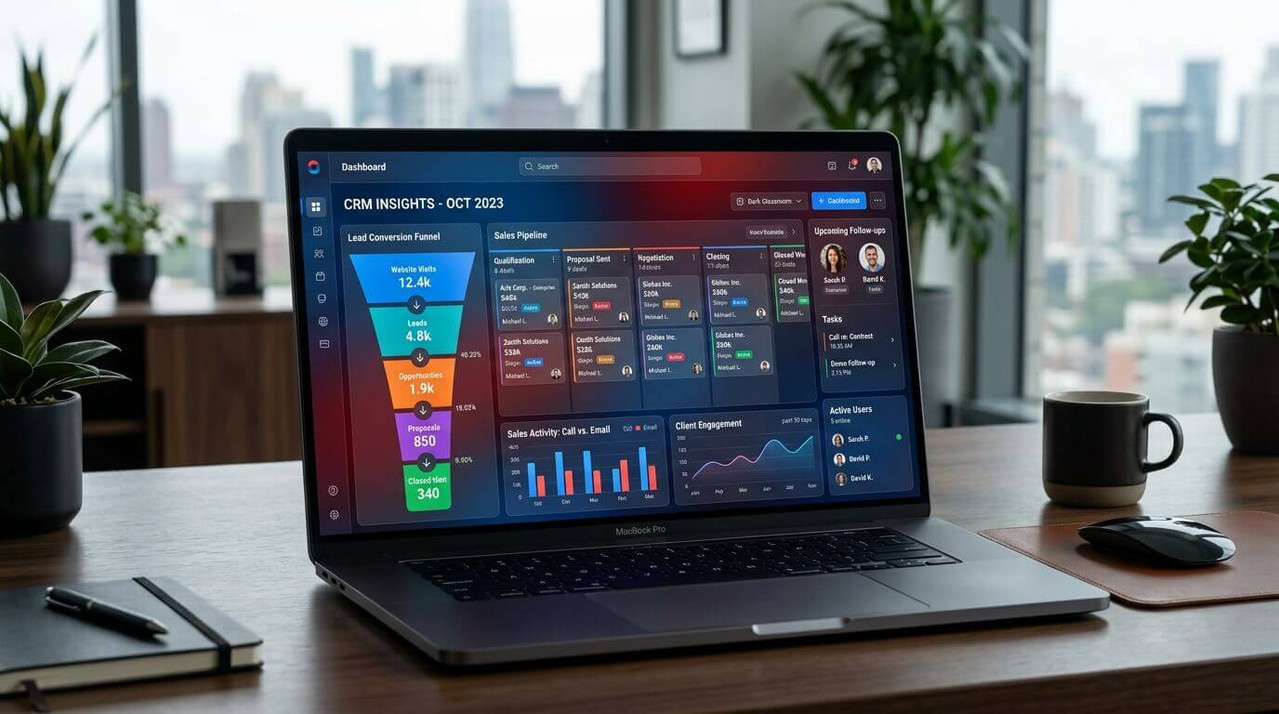
Live CRM Activity Stream
Active FeedWhat Is CRM Software?
CRM stands for Customer Relationship Management. It connects every stage of your sales journey into one structured company-wide operational system.
Centralized Sales Intelligence
CRM software is a system used to organize leads, customer information, communication, follow-ups, sales opportunities and relationship history in one centralized platform.
A practical CRM connects the stages of your sales process to give employees a structured way to manage daily sales activities while helping managers understand what is happening across the sales pipeline.
Why Bangladesh Businesses Need CRM
Businesses in Bangladesh often receive customer enquiries from several sources including website forms, Facebook Meta ads via Digital Marketing Services, Google Ads, phone calls, WhatsApp, email, referrals, walk-ins, and exhibitions.
Collecting enquiries isn't usually the difficult part. The challenge is making sure each lead has an owner, a current status and a clear next action without searching separate spreadsheets.
Structured Sales Pipeline Process
Centralize All Enquiry Channels in One Place
Never lose track of potential buyers regardless of where they reach out to your company.
Website Forms
Facebook / Meta Ads
Google Ads & Search
Direct Phone Calls
WhatsApp Messages
Corporate Email
Client Referrals
Walk-In Enquiries
Sales Field Reps
Events & Exhibitions
Key Problems CRM Software Can Help Solve
Transform chaotic sales operations into a predictable, high-performing revenue machine.
Leads Are Scattered Across Excel & Messages
One employee uses Excel. Another saves contacts on a personal phone. Another keeps conversations buried in WhatsApp or Messenger. This creates fragmented customer records.
One centralized customer management database where authorized employees maintain structured lead and customer records.
Customer Follow-Ups Are Being Missed
A lead interested today needs a call next week, a meeting, or a revised proposal. Without structured follow-ups, high-value opportunities are completely forgotten.
Tracks last follow-up, next follow-up date, notes, assigned sales executive, overdue alerts, and completed activities.
Managers Can't See the Sales Pipeline
A manager knows there are 200 leads, but can't tell how many are qualified, who received quotations, how many are in negotiation, or how many deals were won.
Organizes opportunities into clear visual stages so management sees exact deal status across the entire pipeline.
Customer History Leaves With the Salesperson
When a salesperson resigns, customer contacts, price discussions, and deal history leave with their private memory or phone.
Turns customer communication into a permanent company asset. Successors pick up seamlessly without context loss.
Salespeople Receive Duplicate or Unclear Leads
Without centralized lead assignment, multiple salespeople call the exact same client, or nobody takes ownership of incoming leads.
Clear workflow: New Lead → Assigned Employee → Scheduled Follow-Up → Updated Deal Status.
Management Doesn't Know Why Leads Are Lost
Unsuccessful leads are deleted without learning if loss was due to price, timing, competitor, or poor follow-up response.
Maintains lost-reason reporting (Price, Mismatch, Competitor, Timing) to continuously fix sales barriers.
Core Modules of MM IT SOFT CRM
Tailored functionality engineered specifically for sales teams and executive decision-makers.
Lead Management Software
Lead management is the foundation of a sales CRM. Record and organize potential customers from their first enquiry, qualify their intent, and track marketing attribution effortlessly.
- Complete Lead Profile & History
- Lead Source Tracking & ROI
- Automated & Manual Assignment
- Lead Qualification & Priority
- Expected Value & Win Probability
- Custom Lead Status Fields
Configurable Lead Record Fields:
Customer & Contact Management
Once a lead converts, maintain long-term corporate relationships. Structure B2B clients with multiple decision-makers and maintain chronological interaction logs.
- Centralized Company Database
- Multi-Contact Person Hierarchy
- Complete Quotation History
- Chronological Communication Log
- Customer Status & Documents
- Account Continuity on Rep Transfer
B2B Account Structure Example:
Sales Pipeline & Deal Management
Move opportunities seamlessly through custom sales stages. Track deal values, expected closing dates, win probabilities, and reasons for lost deals.
- Visual Kanban Stage Board
- Custom Pipeline Stages
- Deal Probability & Forecasts
- Won vs Lost Deal Analytics
- Lost Reason Categorization
- Proposal & Quotation Sync
Common Lost Deal Reasons Tracked:
Follow-Up & Activity Management
Ensure every opportunity has a scheduled next action. Automatically trigger reminders for upcoming follow-ups, client meetings, demos, site visits, and proposal submissions.
- Today's Follow-Up Dashboard
- Overdue Follow-Up Escalations
- Meeting & Appointment Logs
- Desktop & Mobile Notifications
- Task Assignment & Status
- Employee Activity Audits
Automatic Sales Reminders:
- Upcoming Call Reminder
- Overdue Client Action Alert
- Scheduled Meeting Notification
- Pending Quotation Approval
Sales Performance Reports & Dashboards
Empower management with real-time conversion metrics. Generate executive reports on new leads, lead sources, salesperson activities, sales forecasts, and lost lead patterns.
- Executive Pipeline Dashboard
- Lead Source Conversion Rates
- Salesperson Activity Reports
- Won vs Lost Revenue Analysis
- Employee Follow-Up Compliance
- Customizable Data Exports
Real-time management dashboards eliminate manual spreadsheet compilation before weekly sales meetings.
Lead Conversion Funnel Tracking
A successful business must distinguish between generating enquiries and converting them. A CRM tracks the progress of potential customers through each stage of your sales funnel.
This reporting helps managers pinpoint exactly where potential buyers drop out of the sales process so you can fix bottlenecks.
CRM Software vs Excel Spreadsheets
When does a business need to upgrade from spreadsheets to a structured Customer Relationship Management system?
| Sales Capability / Workflow | Excel / Personal Records | MM IT SOFT CRM Software |
|---|---|---|
| Lead Storage | Scattered across separate files & notebooks | Centralized lead database |
| Follow-Up Management | Manual lists easily forgotten or delayed | Automated & scheduled follow-ups |
| Lead Ownership | Unclear who is responsible for a prospect | Assigned salesperson with status tracking |
| Status Tracking | Manual text notes updated inconsistently | Defined visual sales pipeline stages |
| Customer History | Scattered in WhatsApp, email & memory | Central activity & conversation history |
| Pipeline Visibility | Difficult to see total deal value or stage | Structured pipeline dashboard |
| Sales Reporting | Manual, slow spreadsheet consolidation | Real-time automated CRM reports |
| Data Security & Turnover | Information stays on employee phone or PC | Authorized company access & security |
Role-Based Permissions & Audit Logs
Sales records contain commercially sensitive customer information. Control exactly who can view, edit, assign, approve, or delete data.
Admin / Executive Management
Full system control, global pipeline reports, custom configurations, user role management, system settings, and record deletion privileges.
Sales Managers
Team-wide pipeline visibility, lead re-assignment, quotation approval, team follow-up compliance, and performance reports.
Sales Executives
Restricted to viewing and managing assigned lead records, scheduling follow-ups, logging client notes, and requesting quotation approvals.
CRM Software Integration Services
Connect your sales system with your website, social media, communication channels, ERP, and accounting platforms.
Website Lead Integration
Website contact forms can automatically push incoming lead submissions directly into the CRM without manual copying.
Website Form → CRM Lead → Auto AssignmentFacebook Lead Ads Integration
Connect Meta Lead Generation ad campaigns via Digital Marketing Services so leads instantly enter your sales workflow.
Meta Lead → CRM → Rep Alert → Immediate CallWhatsApp & SMS Integration
Send automated appointment reminders, quotation alerts, and instant follow-up confirmations over WhatsApp and SMS.
CRM Reminders → WhatsApp API → Client AlertCRM and ERP Integration
Move won deals into operational ERP workflows like Inventory Management Software or billing ledgers.
Lead → Deal Won → ERP Order → AccountsAccounting System Sync
Share customer balances, invoices, payment history, and revenue records between the CRM and your accounting ledger.
Quotation → Approval → Accounting InvoiceCRM Workflow Automation
Automate repetitive administration tasks like lead routing, task creation, status updates, and management approvals.
Rule Trigger → Auto Action → Rep NotificationCRM Software Tailored for Every Industry
Configured specifically around your sector's sales cycle and customer communication needs.
Small Businesses & SMEs
Start with essential lead management, follow-ups, contact database, and basic pipeline reports without overwhelming complexity.
B2B Sales Teams
Manage multi-step consultative sales involving requirement meetings, demos, quotations, contract negotiations, and multi-month deals.
Service & Agency Businesses
Organize incoming inquiries, proposals, client scope discussions, contract renewals, and recurring service appointments.
Real Estate Companies
Track buyer leads, property preferences, ad campaign sources, scheduled site visits, sales reps, and unit closing stages.
Trading & Distribution
Connect customer relationship data with Super Shop POS Software or wholesale dealer re-orders.
Software & IT Companies
Track trial signups, demo requests, feature requirements, scope proposals, enterprise licensing, and client onboarding.
Ready-Made CRM vs Custom CRM
Which solution fits your company's operational complexity?
Ready-Made CRM
A ready-made system can work when standard sales stages are sufficient, few custom fields are required, existing integrations are enough, and your business can adapt to the software's fixed workflow.
Custom CRM (Recommended by MM IT SOFT)
Custom CRM software becomes relevant when your sales stages are unique, custom approvals are required, existing ERP software needs integration, complex user permissions are needed, or special reports are required.
Our CRM Software Development Process
How MM IT SOFT LTD plans, develops, and deploys your custom CRM system.
Sales Process Discussion
We analyze how enquiries currently arrive, how reps track them, follow-up habits, and reporting needs.
Workflow Mapping
We map your sales journey from initial lead capture to qualification, quotation, deal win, and customer onboarding.
Module & Permission Planning
We define user roles, security levels, custom lead fields, pipeline stages, and required integrations.
Development & Configuration
Our software engineering team builds your custom CRM dashboard according to the approved scope.
Rigorous Testing
We test lead routing, follow-up reminders, quotation approvals, user permissions, and report accuracy.
Secure Deployment
The application is deployed on your preferred cloud server or local infrastructure with high security.
User Setup & Training
We configure team accounts, assign user roles, and conduct hands-on training for reps and managers.
CRM Software Price in Bangladesh
The cost of CRM software depends on your business requirements rather than a generic one-size-fits-all subscription.
What Affects CRM Software Pricing?
A small sales team requiring basic lead management and follow-ups does not pay the same as a corporation needing multi-department approval workflows, custom dashboards, and ERP integrations.
Why Choose MM IT SOFT LTD?
We approach CRM software as a strategic growth driver, not just a static address book.
End-to-End Sales Workflow
We structure the complete relationship between Lead → Salesperson → Follow-Up → Opportunity → Quotation → Customer.
ERP & Software Developer
As a custom software development company in Dhaka, Bangladesh, we engineer CRM alongside custom ERP, websites, and financial systems.
Local Dhanmondi Office
Located in Haque Mansion, Dhanmondi, Dhaka. Work with a dedicated local engineering team available for face-to-face consultations.
Frequently Asked Questions About CRM
Everything you need to know about implementing CRM software for your business in Bangladesh.
CRM software is a system for managing leads, customers, communication, follow-ups, sales opportunities and relationship history in one centralized platform.
CRM stands for Customer Relationship Management. It describes the processes and software businesses use to manage relationships with potential and existing customers.
CRM software records customer and sales information through stages such as lead capture, assignment, follow-up, qualification, opportunity and deal outcome. This creates a shared sales history for authorized employees and management.
Common CRM features include lead management, customer records, contact management, follow-up scheduling, sales pipelines, deals, tasks, activities, user permissions, dashboards and sales reports. The exact modules depend on the CRM implementation.
Yes. CRM software can record lead details, source, status, priority, assigned salesperson, follow-up information and sales activities in one structured system.
Yes. A CRM can maintain scheduled, upcoming, completed and overdue follow-ups so salespeople and managers can see what action is required next.
Yes. Lead assignment can identify which salesperson or team member is responsible for each enquiry, subject to the CRM's configured workflow.
Yes. CRM software can organize opportunities into stages such as new, contacted, qualified, proposal, negotiation, won or lost. Pipeline stages can also be customized where the implementation supports it.
CRM can replace many spreadsheet-based lead-management processes when a business needs centralized ownership, follow-ups, customer history, pipeline stages and reporting. Excel can still be useful for other analytical or ad-hoc tasks.
Yes. A small business can start with essential modules such as leads, customers, follow-ups, pipeline and reports rather than implementing unnecessary enterprise functionality.
Sales CRM Software focuses on managing the sales process from initial enquiry through follow-up, opportunity and deal outcome. It helps salespeople organize activities while giving management pipeline visibility.
Lead Management Software records and tracks potential customers from initial enquiry through qualification and conversion. It can maintain lead sources, ownership, status, follow-ups and related sales activities.
Yes. Custom CRM software can be developed or configured around specific sales stages, fields, permissions, reports, approval processes and integration requirements.
Yes, where technically supported. Website forms can potentially send relevant enquiry information into a CRM so leads can enter the sales workflow without repeated manual entry.
CRM integration with Meta/Facebook lead sources may be possible using supported platform APIs and appropriate permissions. The exact integration should be confirmed during technical analysis.
WhatsApp integration may be possible using appropriate supported APIs and project configuration. Required messaging functionality, provider requirements and workflow should be reviewed before implementation.
Yes. A custom integration can connect relevant CRM and ERP data where the systems provide suitable integration options. This can help move customer information from sales processes into downstream operational workflows.
Cloud CRM Software is hosted in an online server environment and accessed by authorized users through internet-connected devices. It can be useful for distributed teams and businesses that need centralized access.
CRM Software cost in Bangladesh depends on users, modules, customization, workflow complexity, reports, integrations, deployment and support requirements. A requirement analysis is the better basis for an accurate quotation than applying one generic price to every business.
A ready-made CRM may be sufficient for a standard sales process. Custom CRM becomes more relevant when the business needs unique workflows, reports, permissions, integrations or sales stages that a fixed platform doesn't handle well.
Start by mapping your actual sales process. Identify lead sources, sales stages, follow-up rules, users, reporting requirements and integrations, then evaluate whether the CRM can support those workflows without unnecessary complexity.
Bring Leads, Follow-Ups and Sales into One System
If your sales team is managing enquiries across Excel sheets, phone contacts, messages and personal notes, the biggest problem may not be generating more leads—it may be controlling the leads you already have.
MM IT SOFT LTD provides CRM Software in Bangladesh to organize lead management, customer information, follow-ups, sales pipelines, activities and reporting in one structured system.
Haque Mansion, 5th Floor, 21/1 Zigatola, Dhanmondi, Dhaka-1209
+8801860424344
Chat with CRM Engineer