
Restaurant Management Software in Bangladesh Built Around Your Restaurant Workflow
Running a restaurant involves much more than creating a bill.
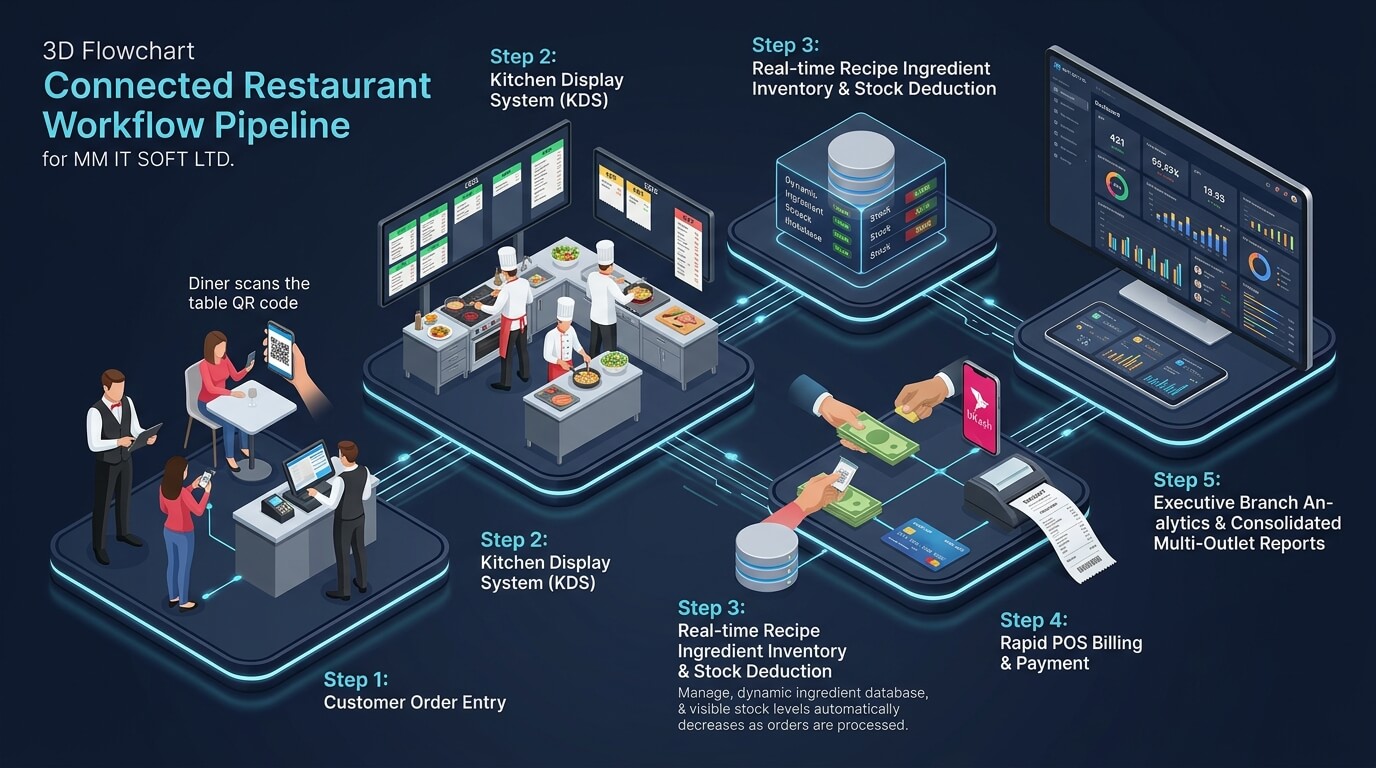
An order may start at a table or counter, move to the kitchen, require changes or add-ons, create a payment, reduce available stock and finally appear in the day’s sales reports. At the same time, managers may need to control tables, staff access, customer information, inventory and several outlets.
When billing, kitchen orders, stock and management reports depend on separate tools or manual records, information has to be entered repeatedly and becomes harder to reconcile.
MM IT SOFT LTD provides Restaurant Management Software in Bangladesh for restaurants that want to organise these connected workflows from one system. Its current restaurant offering covers POS and billing, menu and order management, table reservations, inventory, staff management, CRM, reporting and online-order integration, with features and integrations finalised according to the restaurant’s agreed workflow.
The objective is not to give every restaurant the same fixed setup. MM IT SOFT LTD’s broader software-development approach starts with workflow analysis and operational gaps before defining the system structure.

What Is Restaurant Management Software?
Restaurant management software is a digital system that connects the activities involved in serving customers and managing the business.
Connected Restaurant Operating Environment
A restaurant management system in Bangladesh may connect the point of sale with menu items, orders, tables, kitchen workflow, stock, employees, customers and business reports rather than treating each activity as a separate record.
At its simplest, restaurant software may cover order entry and billing.
A broader Restaurant ERP can connect front-of-house activity with back-office functions such as inventory, customer records, staff management and reporting. The exact scope depends on the restaurant’s operating model and approved requirements. Current restaurant platforms in the Bangladesh market increasingly position themselves as connected operating systems rather than stand-alone tills.
Cross-Department ERP Capabilities
For broader cross-department requirements, see MM IT SOFT LTD’s custom ERP development service.
When food service is tied into central warehouse sourcing, corporate general ledger accounting, payroll, or cross-branch logistics, our engineering team can integrate dedicated ERP modules around your exact organizational workflow.
Problems Restaurant Software Can Help Organise
Running a busy kitchen and dining room with fragmented tools creates costly errors, slow table turns, and stock discrepancies.
Orders Are Entered More Than Once
An order should not need to be copied from a waiter’s note into a billing screen and then communicated separately to the kitchen.
A connected order workflow can keep customer selections, modifiers, table information, kitchen status and billing associated with the same transaction. MM IT SOFT’s current restaurant page states that menu orders can be passed to kitchen display screens from the system.
Billing Is Separate From Restaurant Operations
A restaurant bill may contain multiple items, quantities, modifications, discounts and different payment conditions.
Restaurant billing software in Bangladesh becomes more useful when the transaction is connected with the order rather than recreated at checkout. MM IT SOFT’s restaurant POS module currently covers order processing, bill generation and payment management.
Kitchen Communication Is Difficult During Busy Service
Kitchen operations need clear information about what was ordered and what should be prepared.
MM IT SOFT’s current restaurant software describes a kitchen-display workflow in which kitchen staff receive orders from the menu/order module. Current competitors also heavily surface KDS as a core restaurant-specific feature, making kitchen routing a major SERP expectation.
Stock Records Do Not Reflect Restaurant Activity
Ingredients and raw materials move differently from ordinary retail products.
A restaurant needs to understand purchases, available stock, shortages and operational stock movement. MM IT SOFT’s current restaurant page includes ingredient/raw-material stock control and low-stock alerts.
Managers Cannot See the Whole Operation
If billing, customer information, stock and staff records exist separately, managers may need several reports before they understand what happened during a shift or day.
Connected restaurant software can organise those records under one operating structure and make reporting easier to review.
Multiple Outlets Become Harder to Control
A single outlet may be manageable through local reporting. As branches grow, owners typically need branch-specific information plus a consolidated view. Multi-branch control is a highly visible feature across current restaurant-software SERPs.
Restaurant POS, Orders and Billing
Restaurant POS software in Bangladesh should do more than calculate a total.
For restaurant operations, the POS sits between the customer order, kitchen workflow and payment.
Depending on the agreed MM IT SOFT configuration, the existing restaurant POS/billing scope includes order processing, bills and payment management, with inventory linkage described on the current page.
A useful POS workflow may involve:
Order entered → table/order details confirmed → kitchen workflow → order completed → bill prepared → payment recorded → sales/reporting updated.
For businesses comparing a restaurant POS system in Bangladesh, test the software using a real order rather than only viewing a dashboard. Try a menu item with an add-on or special instruction, send it through the kitchen process, complete the bill and then confirm how the transaction appears in the report.
That demonstrates workflow fit better than a long feature checklist.
How to Test POS in Your Demo
- 1. Select a menu dish with a custom modifier (e.g. "Less Spicy", "Extra Cheese").
- 2. Send order to the kitchen and check ticket arrival on screen or KOT printer.
- 3. Process split payment (Cash + bKash) and apply staff discount voucher.
- 4. Verify that raw materials deduct and end-of-day reports capture the sale accurately.
POS vs Full Restaurant Management Software
A POS and a restaurant management platform are related, but they are not identical. Current restaurant-software comparisons generally treat POS as the order/payment layer and restaurant management as the broader operational system connecting kitchen, inventory, online channels and management controls.
| Restaurant POS | Full Restaurant Management Software |
|---|---|
| Takes orders | Connects the full order workflow |
| Generates bills | Connects billing with operations |
| Records payments | Can connect sales, stock and reporting |
| Maintains menu items | Adds wider menu/order management |
| Usually counter/floor focused | Connects front-of-house and back-office |
| Basic sales reporting | Broader operational reporting |
| May be single-outlet focused | Can support multi-branch requirements |
| Good for basic transaction control | Better for restaurants needing connected operations |
For Cafés and Counter Service
A simple café may only need a fast POS, menu, order flow and daily reports.
For Larger Restaurants & Food Groups
A larger restaurant or restaurant group may need POS, kitchen workflow, tables, stock, staff controls, CRM, online ordering and central reporting.
Kitchen Display and Preparation Workflow
A Kitchen Display System, or KDS, gives kitchen staff a digital view of relevant active orders.
Current Bangladesh competitors make KDS a prominent restaurant-specific entity because it connects front-of-house order entry with kitchen preparation.
MM IT SOFT’s current restaurant page already describes orders being received on kitchen display screens.
During requirement analysis, confirm how your restaurant needs to handle:
order routing, kitchen stations, preparation status, modified items, cancelled items, printed kitchen tickets and completed-order notifications.
Some of those details may require configuration or additional scope, so they should be demonstrated before being treated as included features.
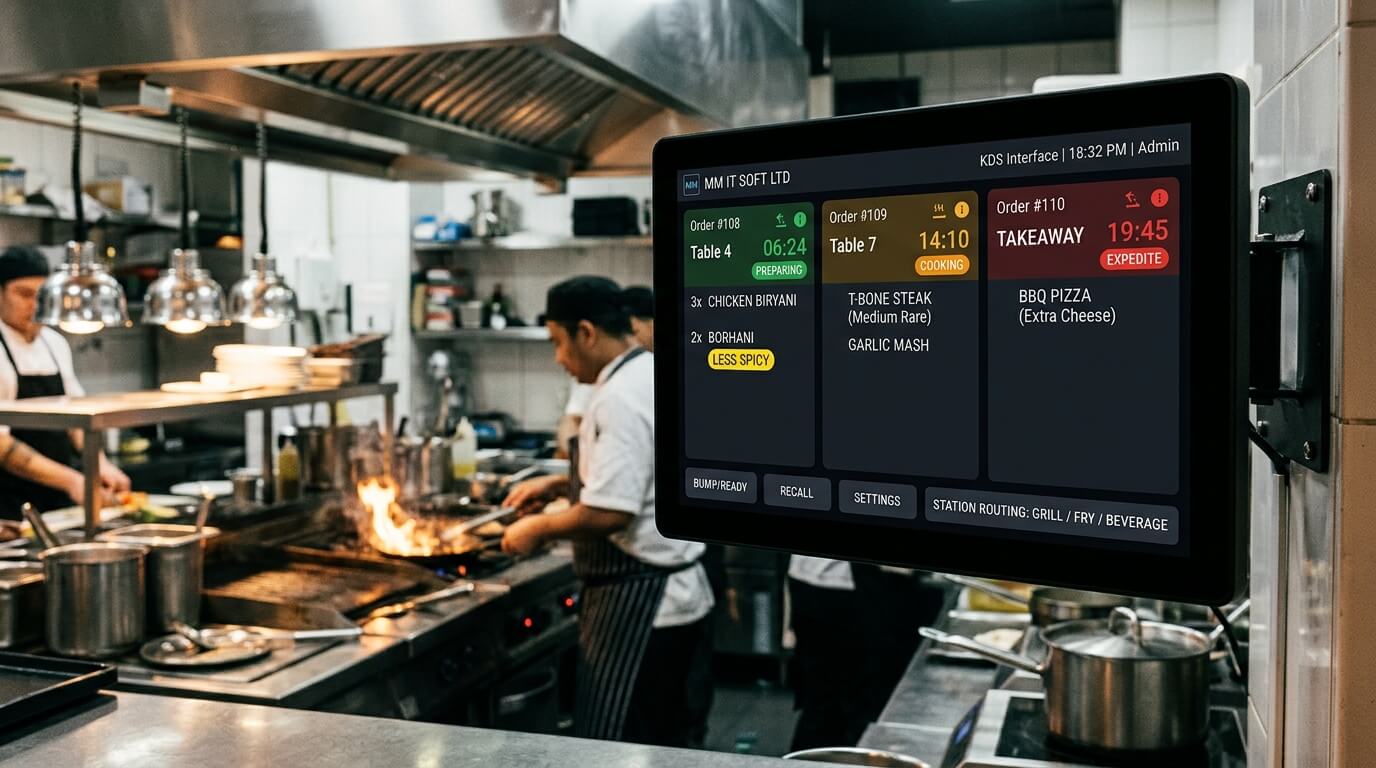
Table and Reservation Management
Full-service restaurants often need to connect tables with active orders.
Connecting Floor Plan with Active Billing
MM IT SOFT’s existing table-reservation module states that it manages availability, bookings and waiting lists.
The final table workflow should reflect how the restaurant actually operates, including questions such as:
- Can staff assign an order to a table?
- Can an occupied table be identified?
- How are reservations recorded?
- How are waiting customers handled?
- Can tables or bookings be viewed by authorised staff?
Those scenarios should be tested during the demo.
Real-Time Table State Tracking
Visual table layouts let front-of-house staff instantly identify table statuses at a glance:
Restaurant Inventory Management Software
Restaurant inventory management software should reflect the way a food business handles stock.
Ingredient & Raw-Material Tracking
MM IT SOFT’s current restaurant page describes tracking ingredients, raw materials and finished goods and providing low-stock and expiry alerts. MM IT SOFT also has a broader inventory platform that can connect stock with POS, purchasing, accounting and ERP workflows.
For restaurant implementation, define which stock events actually matter.
Recipe-level ingredient deduction, yield calculations and detailed food-waste analysis are common restaurant-software requirements in the wider market, but these functions are not clearly verified on MM IT SOFT’s current restaurant page. Restaurants that need them should add them to the requirements discussion rather than assuming they are included.
Inventory Verification Checklist
- Raw ingredient purchase receiving and supplier invoice logging
- Unit-of-measure management (kg, gm, litres, packets, cans)
- Automated threshold alerts when key ingredients fall below minimum stock
- Expiry date monitoring for perishable food items to reduce spoilage
- Central commissary or kitchen-to-branch stock transfers
- Manual stock count reconciliation and wastage entry
Staff Management and Role Permissions
Different restaurant employees require different access.
MM IT SOFT’s current restaurant page includes staff scheduling, attendance, roles, performance tracking and role-based access.
A practical permission structure may separate:
The final access matrix should be based on the restaurant’s own responsibilities and approval process.
For deeper workforce requirements, MM IT SOFT LTD also has an HR & Payroll ERP offering.
Preventing Unauthorized Overrides
Role-based control prevents common operational leakage such as unauthorized bill cancellations, rogue discounts, unrecorded stock adjustments, or modification of closed register shifts.
- PIN / Password based cashier login
- Manager authorization needed for bill void or discount exceeding preset limit
- Audit logging of every cancellation, reprint, or manual price adjustment
- Shift-end cashier cash reconciliation (drawer tally vs system sales)
- Staff attendance and shift scheduling records
Customer Management and CRM
A restaurant CRM is useful when customer information needs to remain connected with previous activity.
Guest History & Loyalty Profiles
MM IT SOFT’s restaurant page currently lists customer preferences, order history, loyalty points and promotional/reminder functions within its CRM description.
Before implementation, decide what customer information the restaurant actually needs and which employees should have access to it.
Avoid collecting unnecessary information simply because the software can store it.
Practical CRM Applications
- Customer phone number lookup during dine-in or takeaway billing
- Order frequency and favourite dish preferences
- Loyalty points accumulation and instant redemption at checkout
- Birthday / Anniversary greeting and promotional discount offers
- Data privacy controls ensuring customer contact details stay protected
Online Ordering and Delivery Workflow
Restaurants increasingly deal with several order channels.
Channel Synchronization
MM IT SOFT’s current restaurant page states that its system can connect online orders from a restaurant website/app or delivery-platform integration and synchronise those orders with relevant workflows.
Because integrations vary by platform, restaurant and commercial agreement, the exact delivery marketplaces, APIs and payment flows should be confirmed during requirement analysis rather than listed as automatically supported.
This matters because current Bangladesh restaurant-software products vary considerably in how they handle direct orders, marketplace tags, rider management and payment gateways.
Delivery Workflow Requirements to Confirm
- Direct online ordering website or mobile web app
- Integration with third-party delivery aggregators (where API access exists)
- Dedicated delivery order routing to kitchen screens or separate packing stations
- Rider assignment, delivery dispatch status, and customer tracking
- Separate accounting for online commission fees vs gross food sales
Restaurant Reporting and Management Information
Restaurant reports should answer operational questions, not simply fill a dashboard.
MM IT SOFT’s current restaurant software describes sales reporting, profit analysis, stock valuation, staff-performance reports and customer insights.
Depending on approved modules, management may need to answer:
A useful demo should answer the reports that the owner actually checks at the end of a day, week or month.
Multi-Branch Restaurant Management Software
A multi-branch restaurant management software structure should allow each outlet to operate without losing central management visibility.
Branch Autonomy with Central Visibility
Current restaurant-market products commonly separate branch menus, stock, staff and reporting while giving authorised owners a consolidated view.
MM IT SOFT’s current restaurant page says its system is suitable for multi-branch restaurants and describes cloud capabilities.
Consolidated Executive Oversight
- Consolidated revenue dashboard across all Dhaka and regional branches
- Branch-wise profit and loss comparison
- Inter-branch stock transfer requests, approvals and transit tracking
- Centralized master menu with branch-level price and item overrides
- Branch manager role restrictions (restricting branch staff to local data)
Cloud Restaurant Management Software in Bangladesh
A cloud restaurant management software in Bangladesh can make restaurant information accessible through an internet-connected architecture, subject to the selected deployment and configuration.
Cloud Deployment Model
MM IT SOFT’s current restaurant page describes cloud capabilities, while its broader custom ERP offering also positions cloud SaaS as an available architecture.
However, one important question should be tested directly:
Current Bangladesh software products handle outages differently. Some explicitly queue eligible orders offline; others rely more heavily on continuous connectivity. Offline behaviour is therefore a buying criterion, not something this page should claim without a verified MM IT SOFT specification.
Cloud Architecture Advantages
- Access live restaurant reports from any phone, tablet, or home PC
- Automated cloud backups protecting historical transaction records
- No requirement for expensive in-house physical database servers
- Instant software updates without manual terminal-by-terminal installations
- Centralized control for multi-branch owners to monitor sales on the go
Custom Restaurant Management Software in Bangladesh
Restaurants do not all operate the same way.
A café with counter service may need a different flow from a full-service restaurant with tables, waiters and a kitchen screen. A restaurant group may also have branch-specific menus, permissions and reporting requirements.
MM IT SOFT LTD positions its wider custom-software and ERP service around understanding business workflows and operational gaps before finalising the system architecture.
For custom restaurant management software in Bangladesh, the requirement discussion can therefore examine:
order types, menu structure, tables, billing rules, kitchen workflow, stock, users, permissions, online orders, branches, reports, existing data and required integrations.
The objective is to determine which modules should be standard, which should be configured and which require custom development.
Restaurant POS and Restaurant ERP Integration
A restaurant does not necessarily need every ERP module.
Front-of-House to Back-Office Continuity
However, larger operations may need restaurant sales and stock to connect with broader accounting, inventory or HR functions.
MM IT SOFT already provides separate accounting, inventory and HR/Payroll ERP services and describes its custom ERP model as connecting business modules according to organisational requirements.
This makes it possible to discuss a restaurant-specific front end together with broader back-office requirements, without turning the restaurant page into a generic accounting or HR landing page.
Available ERP Extensions
- Accounting ERP: Automated journal entries for daily sales, VAT liabilities, card settlements, petty cash expenses and vendor payables.
- Inventory & Commissary ERP: Bulk ingredient procurement, purchase orders, vendor invoices and central warehouse dispatch.
- HR & Payroll ERP: Shift scheduling, biometric attendance, staff overtime, commission incentives and monthly payroll.
Advanced Requirements to Confirm Before You Buy
Some features are common in the current Bangladesh restaurant-software market but should be explicitly demonstrated before they appear in a signed scope.
Ask MM IT SOFT to confirm whether your proposed configuration requires and supports:
QR ordering, local payments, offline billing, purchasing and detailed restaurant stock controls are particularly visible in current Bangladesh competitors, which makes them useful demo questions even where they are not part of MM IT SOFT’s standard verified scope.
How Restaurant Software Implementation Works
MM IT SOFT’s existing restaurant page describes a process covering requirements, demo, module selection, onboarding, setup/data import, staff training and post-launch support. Its company-level development approach likewise starts with workflow analysis and gap identification.
A cleaner implementation path for the landing page is:
Workflow Analysis
Map orders, billing, kitchen, stock and reporting. Start with the current process: how a customer order enters the restaurant, how it reaches the kitchen, how billing works, how stock is tracked and which reports management relies on.
Requirement Definition
Confirm users, branches, modules and integrations. Document required users, branches, modules, reports, integrations and approval rules.
Relevant Demo
Test realistic restaurant scenarios. Do not spend the entire demonstration looking at dashboards. Use real restaurant scenarios. For example, create a table order with a modifier, send it through the kitchen workflow, complete payment and locate the transaction in reports.
Scope and Configuration
Finalise modules, permissions and reports. Finalise which parts of the system need configuration and which require custom development.
Data and Setup
Prepare menu, users and agreed existing data. Confirm menu information, staff users, tables, branches and any historical information that must be imported.
Testing and Training
Test key workflows with relevant staff. Front-counter, waiter, kitchen, manager and administrator roles should test the functions relevant to them before go-live.
Go Live
Move the approved system into daily operation. Move into live use after the agreed workflows have been tested and users are ready.
Support
Handle agreed post-launch support and future requirements.
Restaurant Management Software Price in Bangladesh
There is no single verified MM IT SOFT restaurant price that should be published on this page without an approved commercial package.
The company’s existing restaurant page says pricing depends on modules, users, hosting, SMS/notification integration, mobile-app requirements, training and ongoing support.
A restaurant management software price in Bangladesh can therefore depend on:
| Pricing factor | Why it affects scope |
|---|---|
| Number of outlets | Single-location and restaurant-group requirements differ |
| POS terminals/users | More operational users may change setup |
| Required modules | POS-only and full management systems have different scope |
| Kitchen workflow | Kitchen screens/printers may require additional setup |
| Inventory depth | Basic stock differs from detailed ingredient workflows |
| Online ordering | Website/app/API requirements can change development |
| Integrations | Delivery, payment or third-party systems require technical work |
| Mobile application | Native or specialised apps may be separate |
| Custom reports | Business-specific reporting may require development |
| Data migration | Existing menu/customer/stock data may need preparation |
| Training | User groups and branch count affect onboarding |
| Hosting/support | Deployment and support arrangements affect commercial terms |
Current Bangladesh competitors show why headline price alone can be misleading: published subscriptions range considerably, and modules, branches and hardware differ between vendors. A requirements-based comparison is therefore more useful than copying a competitor’s monthly fee.
How to Choose Restaurant Management Software
A restaurant should evaluate workflow fit before choosing a vendor.
Check the entire order flow.
An order should be tested from entry through kitchen handling, billing and reporting.
Test your most difficult menu scenario.
Use modifiers, add-ons or special instructions that actually occur in your restaurant.
Ask what happens without internet.
Do not assume every cloud platform has identical offline behaviour.
Check kitchen operations.
Confirm whether your team needs KDS, KOT printing or both.
Test inventory using a real ingredient scenario.
If recipe-level consumption is essential, ask the vendor to demonstrate it.
Confirm branch controls.
For several outlets, test whether stock, menu, user permissions and reports can be separated and consolidated.
Review the full commercial scope.
Include software, customisation, hosting, hardware, integrations, migration, training and support rather than comparing only the headline software charge.
Ask for limitations as well as features.
A clear answer about what the system does not currently support is more useful than an oversized feature checklist.
Why Choose MM IT SOFT LTD as a Restaurant Software Company in Bangladesh?
MM IT SOFT LTD is based in Dhanmondi, Dhaka and publicly positions itself as a custom ERP/software company focused on analysing business workflows and building systems around operational requirements.
Workflow-first planning
The company’s stated development approach begins with understanding daily operations, identifying inefficiencies and mapping data flow before system design.
Restaurant-specific modules already represented
Its current restaurant product page includes POS and billing, orders, table reservations, inventory, staff, CRM, reports and online-order integration.
Connection with broader business systems
MM IT SOFT also maintains dedicated inventory, accounting, HR/Payroll, POS and custom ERP capabilities that can be considered when a restaurant needs deeper back-office integration.
Dhaka office with Bangladesh-wide enquiry options
The company lists its office at Haque Mansion, 5th Floor, 21/1 Zigatola, Dhanmondi, Dhaka-1209 and says businesses outside Dhaka can discuss online meetings, demonstrations, implementation, training and support arrangements.
Restaurant Management Software in Dhaka and Across Bangladesh
MM IT SOFT LTD operates from Dhanmondi, Dhaka.
Restaurants in Dhaka can contact the company to discuss software requirements or arrange a demonstration. Businesses elsewhere in Bangladesh can contact the team to discuss available remote meetings, demonstrations, implementation and training arrangements.
This Bangladesh landing page should remain the national commercial page.
Do not turn it into a paragraph containing “restaurant software Dhaka, Chattogram, Sylhet, Rajshahi, Khulna…” purely for SEO. Location-specific pages should be created only when there is enough genuine local evidence to give each page independent value.
Frequently Asked Questions
Clear, transparent answers about restaurant management software scope, features, and implementation in Bangladesh.
Request a Restaurant Software Demo in Bangladesh
A useful restaurant software demo in Bangladesh should test the way your restaurant actually works.
restaurant type, number of outlets, number of POS users, current order process, table requirements, kitchen workflow, stock process, online-order channels, required reports, current software, integration requirements and the operational problems you want to fix.
This gives MM IT SOFT LTD enough context to discuss a relevant module structure rather than showing every feature in the system.
MM IT SOFT LTD
Office Address: Haque Mansion, 5th Floor, 21/1 Zigatola, Dhanmondi, Dhaka-1209, Bangladesh
Phone / WhatsApp: +8801860424344
Email: info@mmitsoft.com