
POS Software in Dhaka for Billing, Inventory, Sales & Business Management
Cash Bill POS Software
POS Software in Dhaka helps retail shops, supermarkets, pharmacies, restaurants, fashion stores, cosmetics shops, and wholesale businesses manage sales, billing, inventory, purchases, customers, payments, and reports from one system. A professional POS system reduces manual mistakes, speeds up checkout, tracks stock in real time, and gives business owners better control over daily operations.
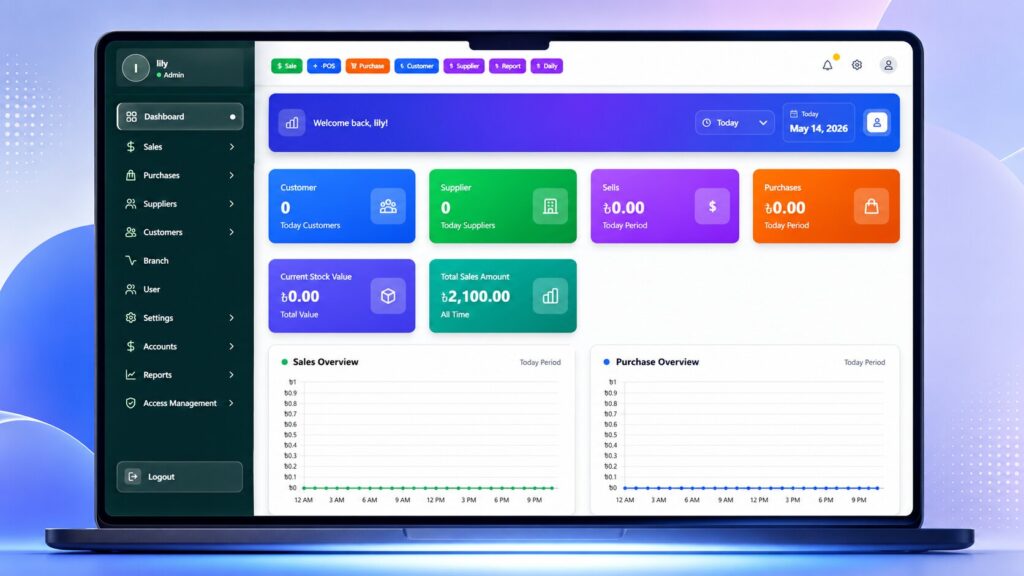
Running a business in Dhaka is becoming more competitive every day. Customers expect fast billing, accurate pricing, smooth checkout, and professional service. At the same time, business owners need proper stock control, daily sales reports, purchase tracking, employee monitoring, and clear profit visibility.
Manual billing, notebooks, or Excel sheets may work at the beginning. But when sales increase, product quantity grows, and multiple employees handle transactions, manual management becomes risky.
That is why MMIT SOFT LTD provides smart POS software in Dhaka for businesses that want to manage sales, inventory, billing, purchase, customer records, supplier payments, and reports from one easy platform.
Why Businesses in Dhaka Need POS Software
Businesses in Dhaka need POS software because manual sales and stock management often create billing mistakes, stock mismatch, slow checkout, missing sales records, and poor reporting. A POS system connects billing, inventory, purchase, payment, customer, and reporting workflows so business owners can manage daily operations with more accuracy and control.
Many businesses lose money not because they do not have sales, but because they cannot track sales, stock, expenses, and profit properly. Without a POS system, business owners often face problems like wrong product price, missing stock, supplier due confusion, unrecorded discounts, and unclear profit reports.
A POS software solves these problems by keeping every sale, purchase, product, payment, and report organized in one system.
Business Problem | POS Software Solution |
Manual billing mistake | Auto invoice and accurate calculation |
Slow customer checkout | Fast billing and barcode scanning |
Stock mismatch | Real-time inventory update |
Missing sales records | Daily, monthly, and yearly sales reports |
Supplier payment confusion | Supplier due and payment tracking |
Customer due problem | Customer ledger and payment history |
Product loss | Stock monitoring and low-stock alerts |
Employee dependency | User role and activity tracking |
Multi-branch confusion | Centralized branch management |
Affordable Plans for Every Pos
Choose the right plan for your pharmacy business. Simple, scalable, and tailored to your needs—with no hidden fees.
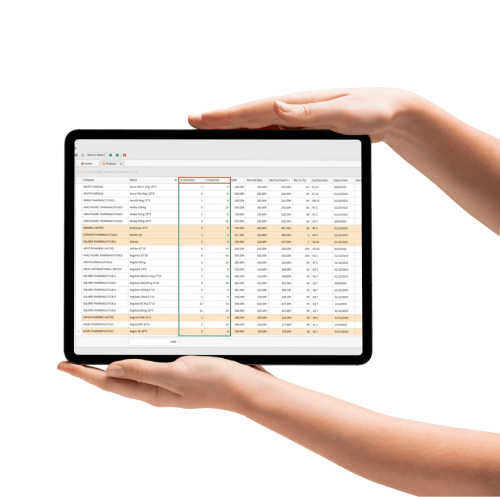
Desktop Plan
Perfect for individual users with premium features
Web Base Plan
Perfect for individual users with premium features
Modernize Your Pharmacy With Automation, Accuracy & Smart POS
One smart solution to manage it all
Run your entire pharmacy with ease, from Medicine Inventory, smart POS System, worry-free Expiry Management, to staying up to date with Finance and Suppliers
Everything you need in one powerful solution

Efficient Inventory Management
Effortlessly manage stock levels, track expiry dates, and automate reordering to prevent shortages and waste.
Enhanced Customer Relations
Maintain detailed patient profiles, track purchase history, and manage loyalty programs to build lasting relationships.
Easy & Fast Billing with Smart POS
Speed up checkouts with our intuitive Point-of-Sale system, handling sales, returns, and billing with complete accuracy.
Smart Supplier Management
Easily manage supplier details, track purchase orders, and maintain communication for a reliable supply chain.
Reporting
Easily manage supplier details, track purchase orders, and maintain communication for a reliable supply chain.
What is POS Software?
POS software, or Point of Sale software, is a digital system that manages sales, invoices, payments, products, stock, customers, purchases, suppliers, and business reports. It helps businesses complete sales faster, reduce manual errors, and track every transaction from one platform.
A POS system is more than billing software. It works as the operational control center of a business. When a sale happens, the system can generate an invoice, update stock, record payment, track customer information, and prepare sales reports automatically.
For businesses in Dhaka, POS software is useful because many shops deal with high customer flow, product variation, cash/mobile/bank payments, supplier purchases, discounts, returns, and daily stock movement.
Sales Report and Daily Cash Report
A business owner should not have to guess how much sales happened today.
With POS software, you can check daily sales, cash sales, due sales, discount amount, return amount, expenses, and collection reports.
A good POS software in Dhaka for daily sales report helps owners understand business performance clearly. You can also explore our POS sales report software for detailed reporting features.
Accounting Support
Many business owners face problems because sales, expenses, purchase, due, and cash records are separated.
POS software helps organize these records in one system. You can check sales, expenses, due collection, supplier payment, and profit-related reports more easily.
For financial control, MMIT SOFT LTD also offers POS accounting software features.
Our POS software helps you manage supplier records, payment history, due amounts, and customer information.
A POS software in Dhaka with customer due tracking is helpful for businesses that sell products on credit. For this use case, connect this section to customer due management software.
Key Features of MMIT SOFT LTD POS Software
A good POS software should include billing, inventory, purchase, supplier, customer, payment, reporting, user management, and business control features. MMIT SOFT LTD POS software is designed to support local business workflows in Bangladesh with easy operation and practical reporting.
Sales and billing management
Barcode scanning
Invoice generation
Product and category management
Inventory and stock tracking
Purchase management
Supplier management
Customer management
Customer due tracking
Supplier payment tracking
Discount and VAT calculation
Cash, bank, and mobile payment tracking
Return and exchange management
Expense tracking
Daily sales report
Profit and loss report
Low-stock alert
User role and permission
Multi-branch management
Business-specific customization
These features help business owners reduce manual work and manage daily operations with better accuracy.
POS Billing Software with Barcode Support
POS billing software with barcode support helps businesses create invoices faster, reduce typing errors, and improve customer checkout speed. Barcode-based billing is useful for retail shops, pharmacies, supermarkets, fashion stores, cosmetics shops, and other product-based businesses.
Fast billing is important for customer satisfaction. If your counter team takes too much time to prepare invoices, customers may become frustrated. Barcode billing makes the sales process faster and more accurate.
Billing Features Include:
Quick invoice creation
Barcode-based product entry
Product search option
Auto price calculation
Discount management
VAT calculation
Multiple payment methods
Invoice print option
Sales return option
Customer due tracking
With MMIT SOFT LTD POS software, your sales team can complete billing faster while owners can track every transaction clearly.
POS Software for Inventory Management
POS software helps manage inventory by updating stock automatically after every sale and purchase. It allows business owners to track current stock, low-stock products, fast-moving items, dead stock, purchase history, supplier-wise stock, and product return records.
Inventory is one of the most important parts of any retail or wholesale business. If stock is not managed properly, businesses face product shortage, overstocking, expired or dead stock, missing products, and profit loss.
Inventory Management Includes:
- Product stock update
- Sales stock deduction
- Purchase stock entry
- Low-stock alert
- Stock adjustment
- Category-wise stock report
- Supplier-wise purchase record
- Product return tracking
- Fast-moving product report
- Dead stock identification
- Multi-branch stock control
This helps business owners make better purchase decisions and avoid stock-related losses.
POS Software for Different Business Types in Dhaka
POS software is useful for any business that handles sales, products, stock, customers, payments, and reports. In Dhaka, it is especially helpful for retail shops, pharmacies, restaurants, super shops, fashion stores, cosmetics shops, electronics shops, and wholesale businesses.
Retail shop
Super shop
Pharmacy
Restaurant and café
Fashion and clothing store
Cosmetics shop
Electronics shop
Mobile accessories shop
Wholesale business
Department store
Book shop
Hardware shop
Lifestyle store
Multi-branch business
Daily sales report
Profit and loss report
Who Should Use Our POS Software?
You should use POS software if your business manages sales, stock, customers, purchases, payments, and reports manually. A POS system is especially important when your business is growing, your product quantity is increasing, or multiple staff members handle daily transactions.
You need POS software if:
- You create bills manually
- Your stock does not match physical inventory
- You cannot track daily profit clearly
- Your billing process is slow
- You have multiple staff handling sales
- You want barcode billing
- You manage supplier purchases manually
- You want customer due tracking
- You want better sales reports
- You manage multiple branches
If your business is growing, manual management will eventually slow you down. A POS system gives you better control before small problems become serious.
People Also Ask FAQ
The best POS software in Dhaka should include fast billing, inventory management, barcode support, sales reports, purchase tracking, customer due management, supplier records, and staff monitoring. MMIT SOFT LTD provides POS software designed for local business needs in Dhaka
The best POS software in Dhaka depends on your business type, features, support needs, and customization requirements. A good POS system should include billing, inventory, barcode, purchase, customer, supplier, reports, payment tracking, and user management
Yes. POS software can manage inventory by updating stock after every sale and purchase. It can also show available stock, low-stock products, fast-moving items, and stock reports.
Yes. POS software is very useful for small shops because it helps manage billing, stock, sales, customer dues, and reports more accurately. It reduces manual mistakes and saves time.
Yes. MMIT SOFT LTD POS software can support barcode scanner-based billing. This helps businesses complete sales faster and reduce product entry mistakes.
Yes. POS software helps you track daily sales, cash collection, discounts, returns, expenses, and business reports. This gives you a clear view of your daily business performance.
Yes. POS software can help manage customer due records, payment history, and collection tracking. This is useful for businesses that sell products on credit.
Yes. You can contact MMIT SOFT LTD to request a demo of POS software in Dhaka and understand how the system can support your business.