
Accounting ERP Software in Bangladesh for Better Financial Control
Bring general ledger, vouchers, customer dues, supplier payments, cash and bank transactions, and financial reports into one organised accounting system. Connect your accounts with sales, purchases, inventory and other business operations.
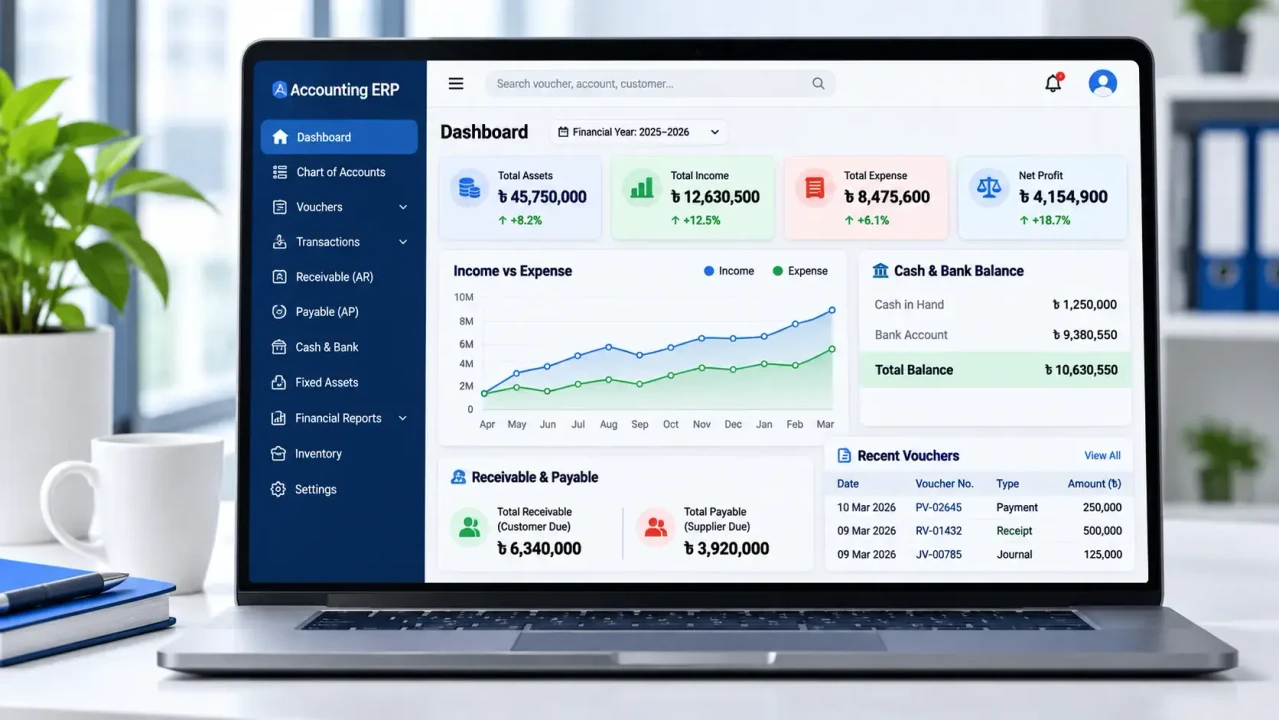
Illustrative dashboard design. Replace with an actual MM IT SOFT product screenshot.
What Is Accounting ERP Software?
Accounting ERP software is a financial management system that connects accounting processes with other business operations such as sales, purchasing, inventory and reporting.
Unlike basic bookkeeping tools, an ERP accounting system can connect financial transactions with the activities that create them. For example, a credit purchase may affect inventory records, supplier payables and the general ledger through a properly configured workflow.
MM IT SOFT LTD provides business accounting and ERP solutions for organisations that need organised financial records, clear reporting and better coordination between departments.
Businesses looking for standalone bookkeeping capabilities can also explore our Accounting Management Software in Bangladesh.
Why Businesses Need an Integrated Accounting ERP
Disconnected records make it harder to track payments, prepare reports and understand business finances.
Customer Due Tracking
Track invoices, partial payments, customer balances and outstanding receivables without relying on separate registers.
Supplier Payment Control
Maintain supplier ledgers, purchase liabilities, payment records and advance adjustments through organised accounting processes.
Delayed Financial Reports
Prepare general ledgers, trial balances, profit and loss statements and balance sheets using properly maintained financial records.
Disconnected Departments
Connect relevant purchase, sales, inventory and accounting activities to reduce unnecessary duplicate data entry.
Cash and Bank Visibility
Record cash receipts, payments and bank transfers with clear transaction histories.
Multi-Branch Accounting
Organise branch-wise transactions and review financial information according to your configured company structure.
Accounting ERP Features for Daily Business Operations
Financial management tools designed around how businesses record transactions, manage accounts and prepare reports.
Chart of Accounts
Organise assets, liabilities, equity, income and expense accounts using a structured ledger hierarchy.
Double-Entry Accounting
Maintain debit and credit entries and review account-wise transactions through the general ledger.
Voucher Management
Manage payment, receipt, journal and contra vouchers with relevant transaction details.
Accounts Receivable
Maintain customer ledgers, record collections and review outstanding customer dues.
Accounts Payable
Manage supplier balances, payment records, liabilities and advance payment adjustments.
Cash and Bank Management
Record cash and bank transactions, transfers and account balances.
Fixed Asset Management
Maintain business asset records and depreciation-related accounting information.
Financial Reporting
Review trial balances, profit and loss, balance sheets, ledgers and other financial reports.
Role-Based Access
Control access to financial records and transactions based on authorised user roles.
How Accounting ERP Works in a Real Business
An ERP accounting system becomes more useful when daily transactions can be traced from operational activity to the relevant financial records.
Customer Invoice and Collection
A customer receives an invoice of BDT 50,000 and pays BDT 20,000.
Payment Received: BDT 20,000
Remaining Due: BDT 30,000
When the receipt is correctly allocated, the customer ledger reflects the outstanding balance.
Supplier Payment Accounting
A business pays BDT 10,000 toward an existing supplier liability.
Bank Account — Credit BDT 10,000
The payment reduces the supplier liability and the bank balance.
Connected Sales, Purchase and Inventory Accounting
A trading business can connect purchasing and sales records with supplier dues, customer collections and accounting entries according to its configured workflows.
The timing of stock valuation, cost of goods sold and other financial postings depends on accounting policies and software configuration.
Explore our Inventory Management Software for related stock and warehouse workflows.
Financial Reports That Help You Understand Your Business
Keep track of financial performance, outstanding liabilities, account balances and transaction histories through properly maintained records.
| Report | Business Purpose |
|---|---|
| Trial Balance | Review debit and credit account balances. |
| Profit and Loss | Review income, expenses and operating results. |
| Balance Sheet | Review assets, liabilities and equity. |
| General Ledger | Trace account-wise transaction records. |
| Accounts Receivable | Review customer dues and payment records. |
| Accounts Payable | Review supplier liabilities and payments. |
| Cash and Bank | Review transactions and available account balances. |
Accounting ERP for Different Business Industries
Different business models require different financial workflows, reports and integrations.
Trading & Wholesale
Manage purchases, customer invoices, supplier payments, credit sales and financial reporting.
Manufacturing
Connect accounting requirements with materials, production costs and finished goods management.
Distribution
Organise retailer collections, supplier payments, operational expenses and financial accounts.
Retail & Multi-Branch
Review branch-wise transactions and connect accounting with relevant retail operations.
Explore Retail Management →Service Companies
Record customer billing, operational expenditure, income and financial reports.
Small & Medium Enterprises
Start with essential accounting functions and evaluate additional modules as business requirements grow.
Cloud Accounting ERP & Custom Software Solutions
The right accounting ERP deployment depends on the company's requirements, users, hosting preferences and customization needs.
Cloud / SaaS Accounting ERP
Cloud-based accounting software allows authorised users to access the system through an online application, subject to the configured environment and permissions.
Discuss hosting, backup arrangements, user access, subscription costs and ongoing support before selecting a cloud deployment.
Custom Accounting ERP
Businesses may require custom approval rules, financial reports, account structures, supplier advance workflows or integrations.
MM IT SOFT LTD can evaluate these requirements and define the proposed software scope.
Custom Software Development →For broader business automation requirements, explore our Custom ERP Software Development solutions.
Accounting ERP Software Price in Bangladesh
Accounting ERP costs depend on the business's modules, number of users, branches, integrations and implementation requirements.
A company needing basic financial reporting has a different scope from a multi-branch operation requiring connected sales, purchasing, inventory and accounting.
Request a Custom Quotation →What Affects ERP Pricing?
- Required accounting modules
- Number of users and branches
- Cloud hosting or separate deployment
- Custom reporting and approval workflows
- Inventory, sales and purchase integrations
- Data migration and opening balances
- Training and implementation
- Maintenance and technical support
Request an itemised quotation to understand setup, recurring and customization costs.
From Software Requirements to Deployment
Successful accounting ERP implementation requires clear requirements, accurate opening balances, proper configuration and user training.
Requirement Discussion
Review accounting processes, reports, departments and software needs.
Software Demonstration
Explore relevant modules and assess compatibility with business workflows.
Configuration
Define the chart of accounts, users, reports and agreed customization scope.
Data Preparation
Prepare customer dues, supplier balances and opening financial information.
Testing & Training
Review selected transactions and train employees on their relevant processes.
Deployment & Support
Complete agreed deployment and provide support under the service arrangement.
Why Consider MM IT SOFT LTD for Accounting ERP?
MM IT SOFT LTD is a Bangladesh-based software development company providing ERP and business management software solutions.
Businesses can discuss accounting requirements alongside inventory, sales, purchasing, HRM and other operational modules.
Discuss Your Software Requirements →Discuss how accounting transactions should work in your specific business.
Evaluate connected accounting, inventory and operational modules.
Review special reporting requirements, approval flows and integration needs.
Assess relevant features and workflows before deciding on implementation.
How to Choose Accounting ERP Software in Bangladesh
Before selecting a provider, review these practical buying considerations:
- Accounting accuracy: Check double-entry posting and financial reports.
- Business suitability: Test actual customer, supplier and payment workflows.
- Integration: Verify required inventory, sales and purchase connections.
- Reporting: Confirm the trial balance, balance sheet and ledger reports.
- User permissions: Review transaction access and approval requirements.
- Implementation: Clarify training, opening balance setup and testing.
- Total cost: Compare initial costs, recurring charges and support terms.
Accounting ERP Software FAQs
Answers to common questions about features, costs, deployment and implementation.
What is the difference between ERP and accounting software?
Accounting software mainly manages financial transactions, ledgers, receivables, payables and reports. ERP connects these functions with other business processes such as purchasing, inventory, sales and manufacturing.
How much does accounting ERP software cost in Bangladesh?
Pricing depends on required modules, users, branches, cloud hosting, customization, integration, data migration and support. Request an itemised quotation based on your requirements.
Can accounting ERP manage customer dues and supplier payments?
Yes. Accounts receivable and payable modules can maintain customer invoices, outstanding dues, supplier liabilities, payment vouchers and related ledger records.
Can accounting ERP software integrate with inventory?
Yes, when the required inventory modules and accounting connections are configured. Relevant purchase and sales activities can be connected with inventory movements and financial records.
Is cloud accounting ERP suitable for small businesses?
Cloud accounting ERP can be suitable for small businesses that need web-based access and centralised records. Evaluate internet requirements, costs, backup arrangements and available modules before choosing a solution.
Does ERP accounting software support double-entry bookkeeping?
Accounting ERP systems generally use double-entry bookkeeping, where valid journal entries maintain corresponding debit and credit amounts. The relevant posting rules should be verified during a software demonstration.
Can MM IT SOFT develop custom accounting ERP software?
MM IT SOFT LTD provides custom software and ERP development services. Businesses can discuss their reporting requirements, approval workflows and software integration needs before finalising the project scope.
How long does accounting ERP implementation take?
Implementation time depends on the number of modules, users, branches, customizations, existing data and testing requirements. A project schedule should be confirmed following requirement assessment.
Ready to Manage Your Business Accounts More Effectively?
Discuss your accounting process, explore relevant ERP functions and request a quotation based on your business requirements.
Explore Related Software Solutions
Connect accounting to the business systems you use every day.