
Retail Management Software in Bangladesh Built Around Your Business
Running a retail business becomes difficult when sales, inventory, purchases, customer dues, supplier payments and branch reports are maintained in different notebooks, Excel files or separate software.
A sale may happen at the counter, but stock may not update correctly. A product may show as available in the system even though the physical shelf is empty. Customer dues may stay in one register while supplier payments are maintained somewhere else. By the time management receives the final report, the information may already be outdated.
MM IT SOFT LTD provides Retail Management Software in Bangladesh designed to bring these everyday retail operations into one connected system.
Instead of forcing your business into a fixed software structure, we can configure or customize the retail system around your product flow, billing process, inventory rules, branches, accounts requirements, user roles and management reports.
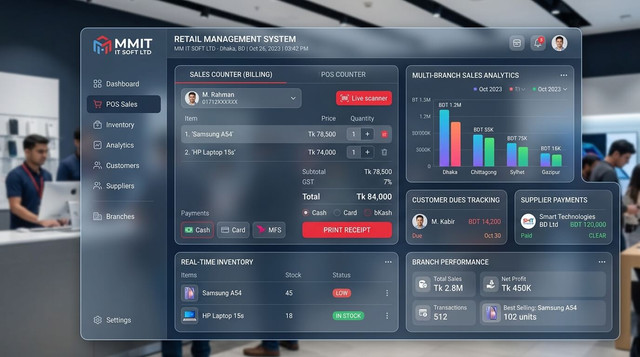
What Is Retail Management Software?
Retail management software is a business system used to manage the day-to-day operations of a retail store, showroom, super shop or retail chain.
A complete retail management system can connect:

The main difference between a simple billing application and a complete retail management system is integration.
For example, when a product is sold through POS:
This connected workflow reduces duplicate data entry and gives the business a clearer view of what is happening across sales, stock and finance.
For businesses that need deeper stock control, see our Inventory Management Software in Bangladesh.
Is Your Retail Business Facing These Problems?
Retail businesses usually start with a simple process. But as products, customers, staff and branches increase, small operational gaps become harder to control.
Stock in the System Does Not Match Physical Stock
Your software may show 30 units available while staff can only find 23 units in the shop or warehouse.
- sales not recorded correctly
- unrecorded stock transfers
- damaged items
- incorrect purchase entry
- return mistakes
- manual stock adjustments
- unauthorized activity
You Cannot See the Real Profit Clearly
Sales may look good, but that does not automatically mean the business is profitable.
Expenses, purchase costs, discounts, returns, damaged stock and supplier payments all affect the actual business position.
Customer Dues Are Difficult to Track
When credit sales are maintained in notebooks, spreadsheets or separate files, it becomes difficult to know:
- who owes money
- how much is outstanding
- what has already been collected
- which invoice created the due
- when the last payment was made
Supplier Payments Become Confusing
Retail businesses often purchase products from multiple suppliers with partial payments or credit arrangements.
The system can keep:
- supplier information
- purchase history
- payment records
- outstanding balance
- purchase return
- supplier ledger
in one organized workflow.
Multiple Branches Are Difficult to Control
As a retail business expands, management needs more than a billing system.
You may need to see:
- branch-wise sales
- branch-wise expenses
- branch-wise stock
- stock transfers
- branch performance
- cashier activity
- product movement
- centralized reports
Complete Retail Management Software Features
MM IT SOFT LTD can configure the required modules according to your retail workflow. Not every shop needs the same system, so modules should be selected based on the actual operation rather than adding unnecessary features.
POS Billing and Sales Management
The POS is the front counter of your retail operation.
A retail POS module can include:
- quick product search
- barcode scanning
- sales invoice
- receipt printing
- cash sales
- credit sales
- partial payments
- discounts
- product returns
- multiple payment methods
- customer selection
- salesperson information
- invoice history
- reprint options
- daily sales summary
The purpose is not only faster billing.
Every completed sale should connect with stock and reporting so staff do not have to enter the same information several times.
Inventory and Stock Management
Stock is one of the most important assets in a retail business.
Our retail inventory software can help manage:
- opening stock
- purchased stock
- sold stock
- returned stock
- damaged stock
- adjusted stock
- transferred stock
- available quantity
- warehouse stock
- branch stock
Management can review product movement instead of relying only on a final quantity.
Product, Category and Variant Management
Retail businesses may manage hundreds or thousands of products.
Products can be organized using information such as:
- product name
- SKU
- barcode
- category
- subcategory
- brand
- size
- colour
- unit
- purchase price
- selling price
- wholesale price
- retail price
- opening quantity
- minimum stock level
Barcode Management
Barcode support can make product identification and checkout faster.
Depending on the workflow, barcode functionality may include:
- barcode generation
- barcode label printing
- barcode scanning
- product search
- purchase entry
- POS billing
- stock checking
- stock transfer
Purchase Management
The purchase module records how products enter the business.
A retail purchase workflow may include:
- supplier selection
- purchase invoice
- product quantity
- purchase rate
- discount
- additional cost
- payment amount
- outstanding amount
- purchase return
- purchase history
Supplier Management
Keep supplier transactions in one organized system.
Supplier management can include:
- supplier profile
- contact details
- purchase history
- payment history
- opening balance
- current payable
- supplier ledger
- purchase return
- supplier statement
Customer and Due Management
For businesses that offer credit sales, customer due management is important.
The retail software can maintain:
- customer information
- sales history
- invoice history
- total purchases
- amount paid
- outstanding amount
- due collections
- sales returns
- customer ledger
Sales Return and Exchange Management
Returns and exchanges affect sales, stock and accounts.
A structured return process can record:
- original sale
- returned product
- returned quantity
- exchange product
- price difference
- refund amount
- stock adjustment
- return reason
Expense Management
Daily retail expenses should not remain outside the business system.
Depending on the requirements, expenses may include:
- shop rent
- transport
- utilities
- staff expenses
- maintenance
- packaging
- marketing
- miscellaneous costs
Accounting Integration
Retail operations and accounting should not be disconnected when management requires accurate financial control.
The system can be integrated with accounting functions such as:
- cash accounts
- bank accounts
- income
- expenses
- customer receivables
- supplier payables
- vouchers
- ledgers
- profit and loss
- financial statements
Multi-Branch Retail Management
A growing retail business may operate several outlets while management needs centralized control.
Multi-branch functionality can be configured for:
- branch-wise sales
- branch-wise inventory
- branch expenses
- outlet performance
- stock transfer
- warehouse-to-branch transfer
- cashier reports
- staff activity
- centralized product information
- management dashboard
Warehouse and Stock Transfer Management
Products may move between a central warehouse and retail outlets.
The software can record:
- transfer source
- transfer destination
- products
- quantities
- transfer date
- approval status
- received quantity
- transfer history
Retail Reports That Help Management Make Decisions
Data becomes useful when management can understand it.
Depending on the selected modules, reports may include:
A well-structured dashboard should help the owner answer practical questions such as:
- How much did we sell today?
- Which products are selling?
- Which products are running low?
- How much do customers owe us?
- How much do we owe suppliers?
- Which branch is performing better?
- What is happening with our inventory?
Retail Management Software for Different Businesses
A single fixed retail template does not fit every industry.
Super Shops and Grocery Stores
Useful functions may include:
- fast POS
- barcode
- inventory
- supplier purchases
- stock alerts
- customer management
- daily sales reporting
- multi-counter operation
Fashion and Clothing Stores
Fashion retailers may need:
- size variants
- colour variants
- brand
- category
- barcode
- seasonal products
- branch stock
- exchange management
Electronics and Mobile Shops
Requirements may include:
- product model
- serial number
- IMEI where applicable
- warranty information
- supplier tracking
- product variants
- customer records
Cosmetics and Lifestyle Stores
These businesses may need:
- brand-based products
- batch information where relevant
- barcode
- multiple price levels
- inventory alerts
- purchase history
Hardware and Building Material Shops
Common requirements may include:
- different units
- large product catalogs
- supplier purchases
- customer dues
- stock tracking
- price variations
Furniture Retail
Furniture stores may require:
- item categories
- product variants
- order tracking
- customer advance
- due collection
- delivery status
- warehouse stock
Multi-Branch Retail Chains
For chains, priority shifts toward:
Retail POS Software vs Retail Management Software
These two terms are related, but they are not exactly the same.
| POS Software | Retail Management Software |
|---|---|
| Mainly focused on checkout | Covers front counter and back office |
| Creates sales invoices | Manages sales plus broader operations |
| Barcode billing | Barcode plus stock movement |
| Payment collection | Payments plus customer/supplier control |
| Basic sales reporting | Sales, inventory, purchase, accounts and branch reporting |
| Counter-focused | Business-wide retail control |
A small shop may initially need only POS and inventory.
A growing business with suppliers, customer dues, multiple users, accounting requirements, warehouses or several branches may need a broader retail management system.
Why Excel Becomes Difficult for a Growing Retail Business
Excel can be useful when the number of products and daily transactions is small.
Problems usually appear when several people need to update the same business information.
For example:
The result can be duplicated data and different versions of the same information.
Retail management software creates a more structured workflow where related operations can update from the same transaction.
Custom Retail Management Software Built Around Your Workflow
This is where MM IT SOFT LTD's approach is different. Your business should not have to completely change its proven operation just because a ready-made software uses a fixed workflow.
Our process starts by understanding:
Then the appropriate modules and workflow can be planned.
Enterprise & Cross-Department Solutions
If your requirement is broader than retail management and includes multiple departments, review our Custom ERP Software Development in Bangladesh.
You can also learn more about our Custom Software Development services.
How Our Retail Software Implementation Process Works
Business Workflow Discussion
We first discuss how your retail operation currently works.
This may cover:
- stores
- branches
- products
- users
- inventory
- purchases
- POS billing
- accounts
- current software
- existing problems
Requirement and Gap Analysis
The next step is to identify which processes should remain, which problems need to be corrected and where automation can reduce manual work.
Module Planning
Required modules can then be selected.
For example: POS + Inventory + Purchase + Customer Due + Supplier Management + Accounts + Multi-Branch Reporting.
Configuration or Custom Development
The system is configured or developed based on the agreed workflow and requirements.
Existing Data Preparation or Migration
Where applicable, existing product, customer, supplier or opening data can be prepared for migration according to the project scope.
Testing
Important workflows should be tested before full use, including sales, purchases, stock movement, returns, payments and reporting.
User Training
Relevant users should understand the functions they are responsible for.
Go Live and Support
Once the system is ready, the business can move to live operation with the agreed support arrangement.
Why Choose MM IT SOFT LTD for Retail Management Software?
Workflow-First Approach
We focus on understanding the way the business operates before recommending the final software structure.
Customizable Modules
A grocery store, fashion shop and electronics retailer do not necessarily require the same system.
Modules can be planned according to the actual retail model.
Connected Business Operations
Retail management can connect POS, inventory, purchase, suppliers, customers, dues, accounting and branch reporting rather than treating each one as a separate system.
Suitable for Growing Operations
A business can plan the system around its current requirements while considering future branches, users and modules.
Bangladesh-Based Consultation
MM IT SOFT LTD operates from Dhaka and businesses can discuss requirements, arrange software demonstrations and plan implementation with the team.
See examples across our client and solution portfolio.
How Much Does Retail Management Software Cost in Bangladesh?
There is no single correct price for every retail management system because the final scope depends on what the business actually needs.
The cost may vary based on:
Instead of selecting software only by the lowest price, compare the features with your actual operational requirements.
For broader ERP budget guidance, see ERP Software Price in Bangladesh.
Simple Retail Requirements
For simple requirements, a business may only need POS, stock and sales reporting.
Larger Retail Chains
A larger retail chain may require POS, warehouse management, multi-branch stock, accounting, centralized reporting, user permissions, integrations and custom workflows.
What Should You Check Before Choosing Retail Management Software?
Before purchasing or developing a retail management system, ask these questions:
Does It Match Your Daily Workflow?
Software should support the way your team actually sells, purchases and moves products.
Can It Handle Your Product Structure?
Check support for categories, brands, variants, sizes, colours, SKUs and barcode requirements.
Can It Control Stock Across Locations?
For multi-branch businesses, branch and warehouse visibility may be essential.
Can It Track Dues Correctly?
If you sell on credit or purchase from suppliers on credit, customer and supplier ledger functionality matters.
Can Different Employees Have Different Access?
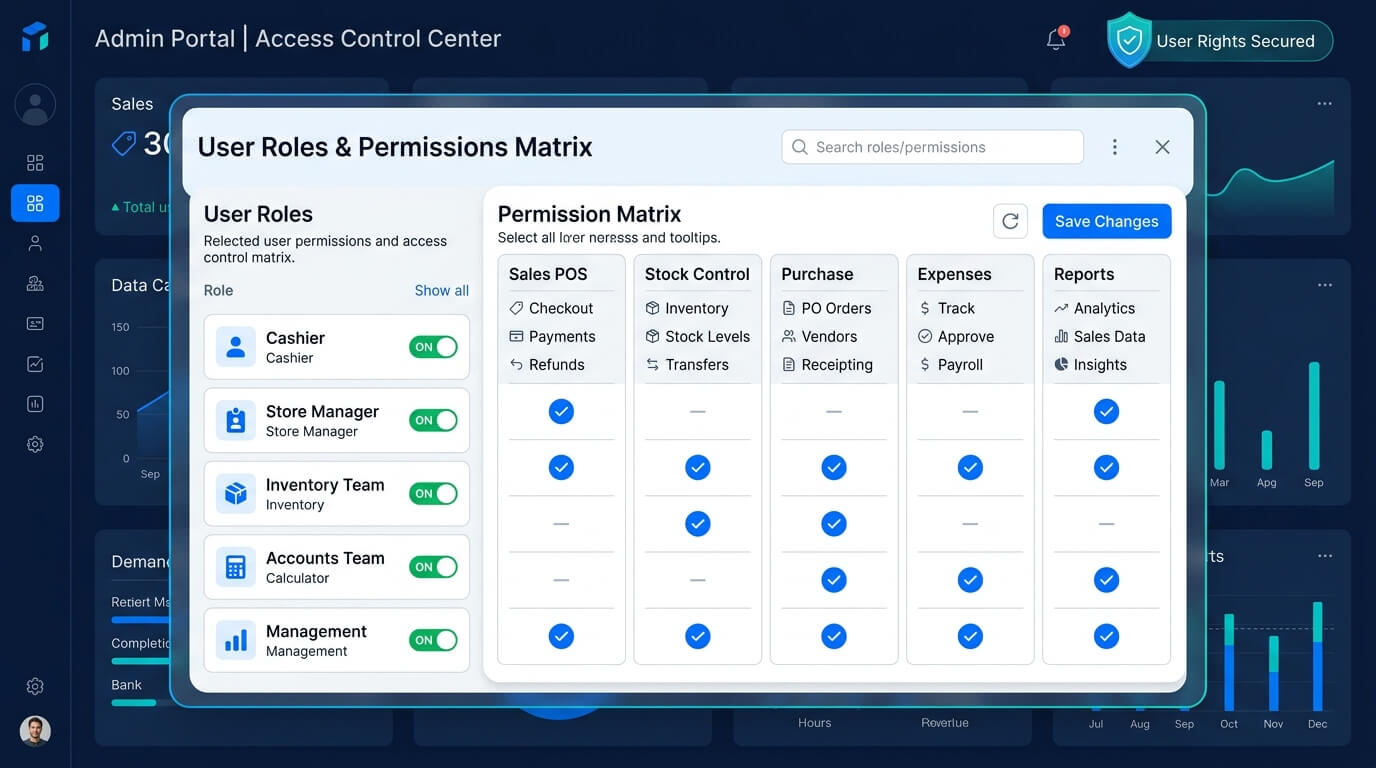
Role-based permissions become more important as the team grows.
Does It Provide the Reports Management Needs?
More reports are not automatically better. The important question is whether the system provides the reports you actually use to make decisions.
Can It Expand Later?
Consider whether additional branches, users, modules or integrations can be added when the business grows.
When Should a Retail Business Move to a Management System?
You should consider a structured retail management system when:
Frequently Asked Questions
Get Retail Management Software Built Around Your Business
Your retail software should give you better control over daily operations, not create another layer of manual work.
If your business is struggling with stock mismatch, disconnected billing and inventory, customer or supplier dues, branch control or delayed reports, discuss the workflow with MM IT SOFT LTD.
We can review your current retail process and identify which modules are actually required.
Request a Retail Software Demo
21/1 Zigatola, Dhanmondi
Dhaka-1209, Bangladesh